



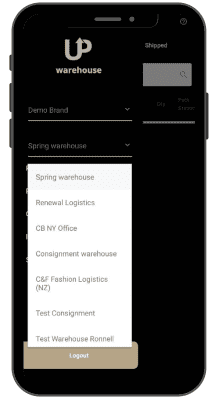


Managing your warehouse operations requires a high level of mobility. You need to be able to receive and check in items, pick and pack products for fulfillment, perform bin transfers, etc., all while on the move.
Thankfully, you can do that, and many more, with the Uphance warehouse app. It’s available on iOS and Android.
Got multiple warehouses spread across different geographic locations? You can easily manage them from one dashboard. The Uphance warehouse app gives you deep visibility into all your warehouse operations.
Pick, pack, and ship customers’ orders accurately and quickly without needing to fire up your computer. Scan label barcodes using your mobile device’s camera – no external scanner needed. Set up packing stations and edit existing ones without breaking a sweat.
Take deliveries of supplies and check them into your warehouse effortlessly. Checked-in items automatically sync with your inventory.
Performing bin transfers and stocktakes just got a whole lot easier. They can be done manually or automatically using your device’s camera as a scanner.
Uphance lets your warehouse staff process returns right from their mobile phones quickly and accurately.
With a few taps of the button, they can scan, verify, and check in returned items, while inventory updates happen automatically in the background.
Allow your warehouse staff use their own device.
Uphance WMS is a cloud-hosted warehouse solution. This means anyone with access to the internet can easily use the app on their mobile device if need be.
Business needs might require limiting access to the warehouse app for certain users. Thankfully, Uphance lets you regulate user access and permission with a few taps of the button.
You don’t need an external scanner to use the app – your phone’s camera is more than enough.
While you need internet connectivity to use the Uphance mobile app, you don’t necessarily need a fast-speed connection. Moderate to low connectivity will do the job.
Uphance uses advanced encryption protocols which ensure your data stays beyond the reach of unscrupulous elements.
| Cookie | Duration | Description |
|---|---|---|
| cookielawinfo-checkbox-analytics | 11 months | This cookie is set by GDPR Cookie Consent plugin. The cookie is used to store the user consent for the cookies in the category "Analytics". |
| cookielawinfo-checkbox-functional | 11 months | The cookie is set by GDPR cookie consent to record the user consent for the cookies in the category "Functional". |
| cookielawinfo-checkbox-necessary | 11 months | This cookie is set by GDPR Cookie Consent plugin. The cookies is used to store the user consent for the cookies in the category "Necessary". |
| cookielawinfo-checkbox-others | 11 months | This cookie is set by GDPR Cookie Consent plugin. The cookie is used to store the user consent for the cookies in the category "Other. |
| cookielawinfo-checkbox-performance | 11 months | This cookie is set by GDPR Cookie Consent plugin. The cookie is used to store the user consent for the cookies in the category "Performance". |
| viewed_cookie_policy | 11 months | The cookie is set by the GDPR Cookie Consent plugin and is used to store whether or not user has consented to the use of cookies. It does not store any personal data. |